
Best CRM for Contractors in 2026: What Actually Matters.
Jobber, ServiceTitan, HouseCall Pro, and custom CRMs each have tradeoffs. Here's what actually matters for a contractor CRM — and what most contractors get wrong when choosing one.
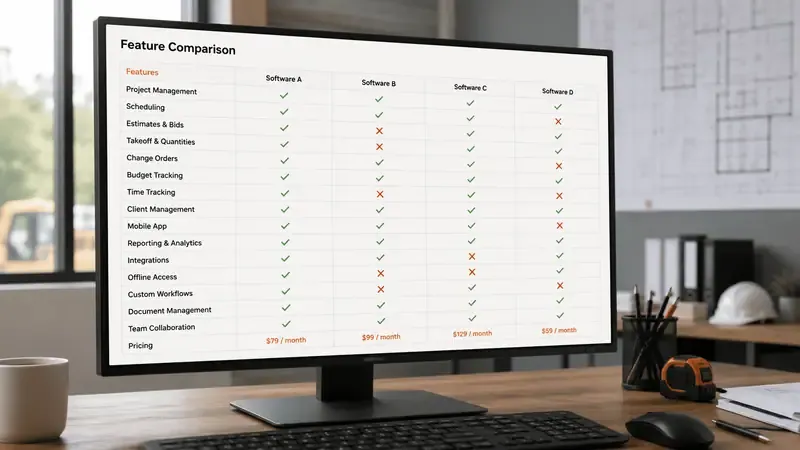
Most contractors are in one of two situations with CRM software: they're using nothing — spreadsheets, sticky notes, a shared Gmail inbox — and they know they should be doing more, or they're paying for a platform and using about 30% of what it can do. The scheduling works. The invoicing works. Everything that requires automation, lead nurture, and follow-up sequence logic is either misconfigured or completely untouched.
Neither situation is a software problem. It's a strategy problem. A CRM is only as valuable as the processes it automates. Before comparing Jobber to ServiceTitan or asking a consultant which platform to use, the more important question is: what specific problems are you trying to solve with software? Because the answer to that question determines which tool belongs in your stack — and which ones will become expensive shelf decoration.
This guide is a practical comparison of the major contractor CRM options in 2026, organized around the jobs a contractor CRM needs to do rather than feature checklists. The goal is to help you pick the right tool for your stage of business — or understand why you might need an integrated system rather than a single platform.
What a Contractor CRM Actually Needs to Do
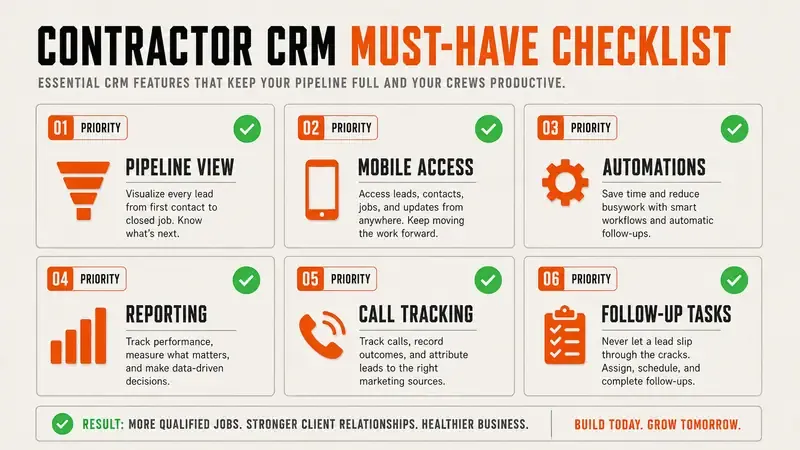
A contractor CRM is not a Rolodex. It is not a scheduling calendar. It is not an invoicing system, though it may contain one. A contractor CRM, used correctly, is a lead-to-close automation engine that captures every inquiry, advances every prospect, and reports on what's working. Here are the five jobs it must perform:
Any contractor CRM that cannot perform all five of these jobs — either natively or through an integration — is missing capability that will cost you leads. The following platform comparisons are organized around these five jobs.
The Four Categories of Contractor CRM
Contractor software in 2026 falls into four distinct categories, each built for a different primary purpose. Understanding the category explains the tradeoffs more clearly than reading feature lists.
The category you need depends on your primary problem. If you have solved lead generation and your main challenge is managing jobs, scheduling crews, and invoicing efficiently, a field service management platform is the right choice. If your main challenge is converting the leads you're generating and following up systematically, you need a sales infrastructure approach — and most field service management tools will not solve that problem, regardless of how well you configure them.
Jobber: The Best Scheduling Tool That's Often Used as a CRM
Jobber is the most widely used platform in the residential contractor space for good reason: it is genuinely excellent at the jobs it was built for. Scheduling, dispatching, client communication, quoting, and invoicing are all well-designed and usable without extensive training. The mobile app is solid. The client portal reduces back-and-forth communication about job status and payments. For a contractor who needs to organize their operations, Jobber delivers real value quickly.
The limitation shows up when you try to use Jobber as a growth platform rather than an operations platform. The automated follow-up sequences for leads and post-estimate nurture are limited in flexibility compared to dedicated marketing automation tools. Lead source attribution requires manual discipline to maintain. The reporting on marketing ROI is basic. If your pipeline problem is that leads are coming in but not converting at a high enough rate, Jobber's feature set does not directly address that.
Best for: Service companies at $500K–$2M+ in revenue that have solved lead generation and need an operations platform to handle scheduling, dispatching, and client communication at scale. Jobber is also a strong choice as an operations layer when paired with a separate marketing automation system that handles lead capture and follow-up.
Not ideal for: Growth-stage contractors under $500K whose primary bottleneck is lead conversion and follow-up consistency. If you're generating 30–50 leads per month and closing fewer than 30% of them, you need a follow-up automation system first — not a job scheduling upgrade.
- Pricing: Core plan starts around $49/month; Connect and Grow plans at $129–$249/month with additional features
- Strengths: Scheduling, quoting, invoicing, mobile app, client portal, two-way texting
- Limitations: Lead nurture automation, marketing attribution, post-estimate follow-up sequences
ServiceTitan: Enterprise-Grade Power With Enterprise-Grade Complexity
ServiceTitan is the platform built for mature, multi-location HVAC, plumbing, and electrical businesses that want deep operational visibility and comprehensive analytics. The feature set is genuinely impressive: marketing attribution that tracks a Google click all the way to a closed job, technician performance reporting, call recording and scoring, membership/maintenance plan management, and a customer database that spans the entire history of the relationship. For the right operator, ServiceTitan is the most powerful tool available in the space.
The tradeoffs are significant and not always communicated clearly in the sales process. Implementation typically takes 6–12 months and requires dedicated internal resources to configure correctly. Training your team on ServiceTitan is a real project, not an afternoon. And the pricing — which starts around $400–$500 per month for small teams and scales quickly with additional technicians and features — represents a meaningful fixed cost that needs to be justified by the business volume it supports.
A $500K residential electrical company that signs up for ServiceTitan because they heard it was the best will spend six months fighting the configuration, pay for features they don't use, and end up with a system that does scheduling and invoicing — exactly what Jobber could have done for one-fifth the price. ServiceTitan's value is maximized at $2M+ in revenue where the reporting, attribution, and multi-technician management features justify both the cost and the implementation burden.
Best for: Established operators at $2M+ in HVAC, plumbing, or electrical who want comprehensive analytics, marketing attribution, and the operational depth to manage large teams. Also appropriate for companies actively pursuing private equity or acquisition, where clean financial and operational data is valuable.
Not ideal for: Sub-$1M operators or any contractor whose primary need is faster lead response and better follow-up sequences. The implementation overhead and monthly cost are not justified until the operational complexity of the business genuinely requires enterprise-grade tooling.
HouseCall Pro: The Mid-Market Workhorse
HouseCall Pro sits between Jobber's simplicity and ServiceTitan's complexity in both features and price. The platform has made significant investments in customer communication tooling — two-way SMS, automated review requests, and customer notification sequences are genuinely well-executed. The marketing integrations have improved considerably in recent versions, with better lead source tracking and Google Ads connection than previous iterations. For a 3–15 person home service company, HouseCall Pro covers the most important operational ground without the implementation burden of ServiceTitan.
The limitation for growth-focused contractors is the automated lead nurture. The sequences available for post-estimate follow-up are functional but not deeply flexible. Building a sophisticated follow-up program — a 7-day sequence with branching logic based on whether a lead opened your quote, for example — typically requires an external integration with something like ActiveCampaign. HouseCall Pro handles the job lifecycle well; it does not fully own the pre-job sales lifecycle in the way a dedicated sales infrastructure platform would.
Best for: 3–15 person home service businesses at $300K–$2M that need solid scheduling, customer communication, and basic marketing automation without the complexity or cost of ServiceTitan.
Not ideal for: Contractors with a specific, identified lead conversion problem. If your close rate is under 30% and you're generating sufficient lead volume, HouseCall Pro will not fix that — you need to address the follow-up automation and response time systems specifically.
- Pricing: Basic plan around $99/month; Essentials and Max plans at $149–$299/month
- Strengths: Customer communication, review request automation, scheduling, invoicing, improving marketing integrations
- Limitations: Advanced lead nurture sequences, pre-estimate sales automation
The Sales Infrastructure Approach: When You Need More Than a CRM
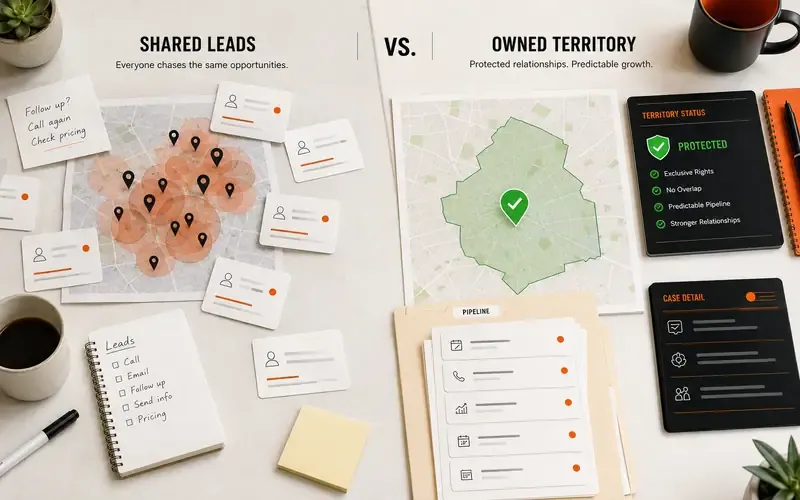
Some contractors don't have a CRM problem. They have a lead capture problem, a speed-to-lead problem, and a follow-up automation problem. These are related but distinct from the scheduling and operations problems that field service management platforms are designed to solve. When the bottleneck is before the job is booked — when leads are going cold because no one responded fast enough, or because the post-estimate follow-up sequence doesn't exist — adding a better scheduling tool doesn't help.
An integrated sales infrastructure combines the functions that a standalone CRM does not cover natively: AI-powered instant response to new leads (so that the 60-second window is never missed, even at 11pm on a Sunday), ad platform tracking that connects a Meta or Google click to a revenue outcome, automated follow-up sequences that run without manual triggering, and a single reporting dashboard that shows lead source ROI in real time. The CRM sits inside this system as the record-keeping and pipeline management layer — but it is not expected to do the work that the other components handle.
This is the architecture that growth-stage contractors — typically $300K–$1.5M, generating 20–80 leads per month, and needing to close a higher percentage of what they generate — actually need. The question isn't "which CRM should I use" but "what system covers the full lifecycle from ad click to signed contract, and where does a CRM fit inside that system."
What to Look For When Choosing
- ✓ Does it capture leads from all your sources — forms, inbound calls, LSA, Meta — automatically, with source recorded?
- ✓ Does it trigger an automated response within 60 seconds of a new inquiry, including outside business hours?
- ✓ Does it have customizable automated follow-up sequences for post-estimate nurture (not just one auto-reply)?
- ✓ Does it track lead source ROI — connecting ad spend to closed revenue — in a report you can pull in under 5 minutes?
- ✓ Can your team actually use it without extensive training or IT support to maintain it?
- ✓ Does it integrate with your ad platforms (Google Ads, Meta, LSA) without requiring a developer to set up?
- ✓ Is the mobile experience functional for a field team that doesn't sit at a desk?
- ✓ Is onboarding supported, or will you be relying on help docs and forums to get set up?
No single platform checks every box perfectly for every contractor. The exercise of going through this list honestly for your current situation will tell you which gaps are most urgent — and therefore which category of tool to prioritize.
The CRM Graveyard: Why $50K+ in Software Goes Unused
The pattern is consistent enough that it has a name in the industry: the CRM graveyard. A contractor buys a platform — sometimes after a conference demo, sometimes after a recommendation from a peer — pays for the enterprise tier, completes partial onboarding, and six months later is using the calendar and the invoicing module while everything else sits idle. The automation is still in its default state. The pipeline stages were never customized to match the actual sales process. The lead source tracking was never connected. The follow-up sequences were never built.
This is not a software failure. The software works. It's an adoption failure — and adoption failures are almost always caused by implementation complexity that exceeds the capacity of the team to absorb it while running a business. Tools that require extensive manual data entry get abandoned because manual data entry doesn't happen consistently in a field service business. Tools with 12-module onboarding programs get partially implemented because no one has 40 hours of uninterrupted time to complete them.
The principle that should guide CRM selection is: use the simplest platform that can be fully automated, not the most powerful platform that theoretically covers everything. A simpler platform that is 100% configured and running automated sequences will outperform a powerful platform at 30% configuration every time. The follow-up automation that runs on a Tuesday afternoon when you're on a job site is worth more than the advanced analytics you've never had time to set up.
The practical test for "will my team actually use this" is to have your least tech-savvy team member or office manager attempt to complete three tasks in the platform without help: add a new lead, book an estimate, and send a follow-up message. If it takes more than 10 minutes and requires looking something up, the platform is too complex for consistent adoption. Complexity that doesn't match team capacity becomes the barrier that keeps the CRM graveyard full.
The average contractor CRM is used for scheduling and invoicing — and nothing else. The lead capture, follow-up automation, and ROI reporting that justify the monthly fee are either misconfigured or never set up. You're paying for infrastructure you're not using.
The right CRM is the one that gets fully implemented and stays that way. A system that captures every lead automatically, responds within 60 seconds, runs a post-estimate sequence without manual input, and reports on lead source ROI monthly is more valuable than any platform that can theoretically do all of that but requires six months to configure and a dedicated admin to maintain. Start with the five jobs. Find the simplest tool that does all five. Implement it fully before adding complexity. That sequence, more than any platform comparison, is what separates contractors whose software earns its monthly fee from those who pay for tools they don't use.
Related Articles.
Want this system installed for your trade?
See if your market is still open, then book a 20-30 minute install call. No contracts.